

This guide explains how clients with Fireblocks custody can integrate with the Smart Wallet and Strategy system, including deposits, withdrawals, position tracking, and recommended security best practices.Documentation Index
Fetch the complete documentation index at: https://docs.deframe.io/llms.txt
Use this file to discover all available pages before exploring further.
Overview
The integration leverages Smart Wallets to provide segregated user accounts while keeping your Omnibus wallet isolated from strategy bytecode execution. This architecture ensures maximum security by preventing your main operational wallet from signing potentially untrusted transactions.Architecture Flows
Depending on how you custody user funds on Fireblocks, the integration has two possible entry points. Both paths converge into the same flow after the owner vault is defined.- Omnibus Account — all users share a single Fireblocks vault. You must create a dedicated Vault Owner that will act as the signer for every Smart Wallet. This isolates strategy execution risk from the vault that actually holds funds (Omnibus).
- Segregated Vaults — each user already has their own Fireblocks vault. That vault is used directly as the Smart Wallet owner, so no additional setup is required.
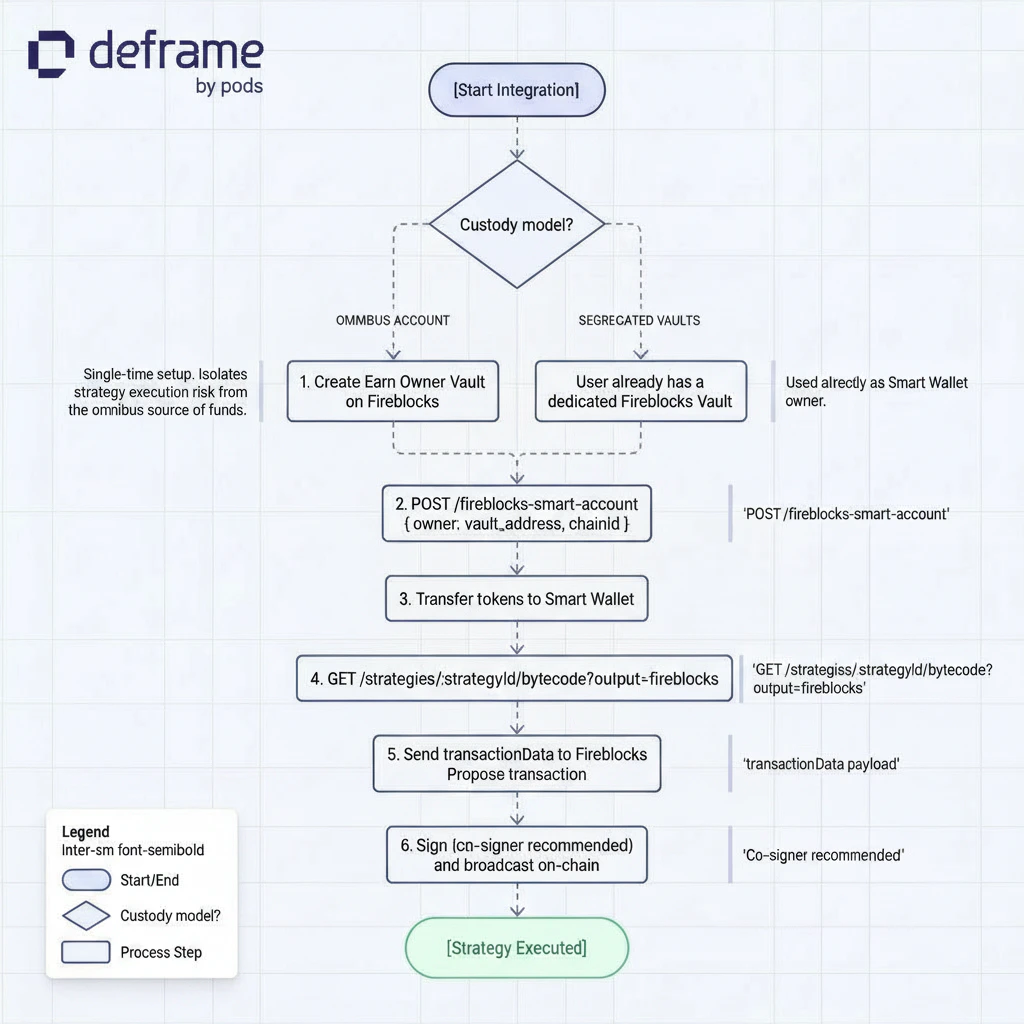
In the Omnibus model, the Vault Owner created in step 1 is the signer for every Smart Wallet you provision. In the Segregated model, each user’s own vault plays that role — there is no shared owner vault to create.
Prerequisites
Before starting the integration, ensure you have:
- A Fireblocks account with API access
- Understanding of Fireblocks Transaction Authorization Policy (TAP)
- Familiarity with the Architecture Overview
1. Fireblocks Setup
To safely interact with strategy bytecode while isolating your Omnibus wallet, Fireblocks must be configured with dedicated roles and policies.Creating Roles
To ensure clean separation of responsibilities and secure execution:| Role | Description |
|---|---|
| Initiator | The API user or service responsible for submitting strategy-related transactions to Fireblocks. |
| Vault Owner | A dedicated vault that acts as the Smart Wallet Owner. This address serves as the signer for smart wallet transactions, providing security segmentation from your main operational wallet. |
Creating Policies
Two policies must be configured in Fireblocks to ensure automated, safe signing of transactions:Contract Call Policy
| Setting | Value |
|---|---|
| Initiator | The API user created for calling Fireblocks strategy operations |
| Source | Vault Owner |
| Signer | Co-signer (for automatic signing) |
2. Smart Wallet Creation
Each user receives their own segregated smart wallet. Smart wallets (Gnosis Safe accounts) can be provisioned via the API:| Parameter | Type | Required | Description |
|---|---|---|---|
owner | string | ✅ | The Vault address that will own the Gnosis Safe |
chainId | number | ✅ | Chain ID on which to deploy the Safe |
The Safe address is computed deterministically via CREATE2 and returned immediately. Actual on-chain deployment happens asynchronously in the background. If the Safe is already deployed, the existing address is returned.
- Display user balances and yield
- Track user performance
- Execute operations on behalf of users
3. Deposit Flow
When a user wants to deposit into a strategy (e.g., 100 USDC):Transfer Funds to Smart Wallet
Transfer the deposit amount from your Omnibus wallet to the user’s
smartWalletAddress.Request Strategy Bytecode
Fetch the bytecode for the deposit operation:When using Fireblocks, set
output=fireblocks and provide accountId (the Fireblocks vault account ID). The response will include a transactionData object ready to submit directly to the Fireblocks API instead of a raw bytecode array.See How to Deposit for detailed parameter information.Sign and Execute via Fireblocks
- Use the Vault Owner signer (NOT the Omnibus signer) to sign the transaction
- If using
output=fireblocks, the response contains atransactionData.transactionRequestobject ready to submit directly to the Fireblocks Transactions API (POST /v1/transactions) - If using
output=bytecode(default), execute the returned bytecode through Fireblocks manually - The transaction will deposit funds from the smart wallet into the strategy
4. View User Positions and Yield
To fetch a user’s position, balance, or yield:5. Withdrawal Flow
Withdrawals follow the reverse flow:Trade-offs
Additional Transfers
Requires two separate transfers for deposits and withdrawals: Transfer IN (Omnibus to Smart Wallet) and Transfer OUT (Smart Wallet to destination)
Omnibus Isolation
Your Omnibus signer is never exposed to potentially malicious bytecode, preventing scenarios similar to known custody exploits
User Segregation
Each user operates through a fully segregated smart wallet
Auditability
Clean audit trail and easier accounting per user. Aggregated deposit analytics available via the
/analytics endpointOptional: Additional Security Layer
For maximum security, you can integrate Blockaid to simulate and validate bytecode before signing it on Fireblocks.Next Steps
Deposit to Yield
Generate bytecode for depositing into yield positions
Withdraw
Learn how to withdraw from positions
Check Positions
Monitor your open yield positions
Privy Integration
Embedded wallet solution with social login